Page 1 of 1
AP new calbration - new garmin connect app
Posted: Sun Feb 15, 2026 6:07 am
by kdx200
Hi,
i did the AP calibration with the new Velocomp garmin app.
I tried to follow the screen and i think i did it ok.
In the first step doing the "first 50%" the screen DID NOT show the figures..it only says "ride to the 50%" and there is a below bar that suggests that the calibration is being done. Then the screen also tells you to stop and back....again there is no figures..so i follow the "below bar" and thats it.
When done inmediately starts to show you the slope, wind and power. As i dont have a dpfm meter in this bike i assumed that is ok to not show the CDA and the AP is like a Powerpod. Ok with that.
John, can you please the files. MAybe the power numbers are a bit low.
I have no Powerstroke data as i had in my previous and beloved PPv5. Is there any addciontoal setup to do?
thanks
Re: AP new calbration - new garmin connect app
Posted: Sun Feb 15, 2026 10:40 am
by Velocomp
You used the Velocomp app calibration correctly! It won't show data during the calibration process...
I looked at your ride file. You have an extremely low CdA. Are you riding a TT bike? If so, how tall are you?
If you aren't riding a TT bike, then what kind of bike do you have?
Re: AP new calbration - new garmin connect app
Posted: Sun Feb 15, 2026 2:34 pm
by kdx200
Hi,
height 175cms
weight 70kg
Bike TT (the AP is under the extension bar as ever since.. years)
Tell me the next step to do please
thanks
Re: AP new calbration - new garmin connect app
Posted: Sun Feb 15, 2026 8:41 pm
by Velocomp
kdx200 wrote: ↑Sun Feb 15, 2026 2:34 pm
Hi,
height 175cms
weight 70kg
Bike TT (the AP is under the extension bar as ever since.. years)
Tell me the next step to do please
thanks
Your CdA is too low. Load this profile into your AP using the command Edit/Edit Profiles/Import. Then, connect your unit to VA and load the profile into your unit. You should get higher watts...
Also attached is the corrected 7km ride file with your new profile.
Re: AP new calbration - new garmin connect app
Posted: Mon Feb 16, 2026 1:44 pm
by kdx200
got it!
i will be posting a new ride wth the updted profile.
By the way, the IQ app is no configurable as any fields i already have (traffic, tpms, etc)
It would be great to have the option to select which data you desire.... watts, cda, slope, ta.
Actually you must have one big field with all the data.
For example...the slope data coming from AP/PP is great and i use it in the hills climbs sections...now in the middle of the ride i need to go to the dedicated screen where i have the "velocomp field".... not confortable.
Also, the Newton Tracker app. I tried to nstall in the garmn edge. I ve an APK file you sent me some time ago (ts not at the Garmin Play and not n this forum as i searched carefully) and it can not be installed as it says its and old version and not supported in the actual Android,
thanks
Re: AP new calbration - new garmin connect app
Posted: Sun Feb 22, 2026 8:25 am
by kdx200
Hi John,
new file attached. Can you check it...i think you can tweak the setup a little.
By the way, i still cant use the newton tracker... maybe there is a new APK file but i cant find it.
thanks
Re: AP new calbration - new garmin connect app
Posted: Sun Feb 22, 2026 11:19 am
by Velocomp
Here's how to tweak things:
1) You are doing closed loop laps, so adjusting your wind factor is acceptable. If the file isn't for closed loops, then adjustment is risky
2) Your unadjusted file shows watts of 156.6. and a wind scaling balance of 1.0--this means your wind readings are slightly high, leading to higher watts
3) Click on lap 1. It will then be highlighted
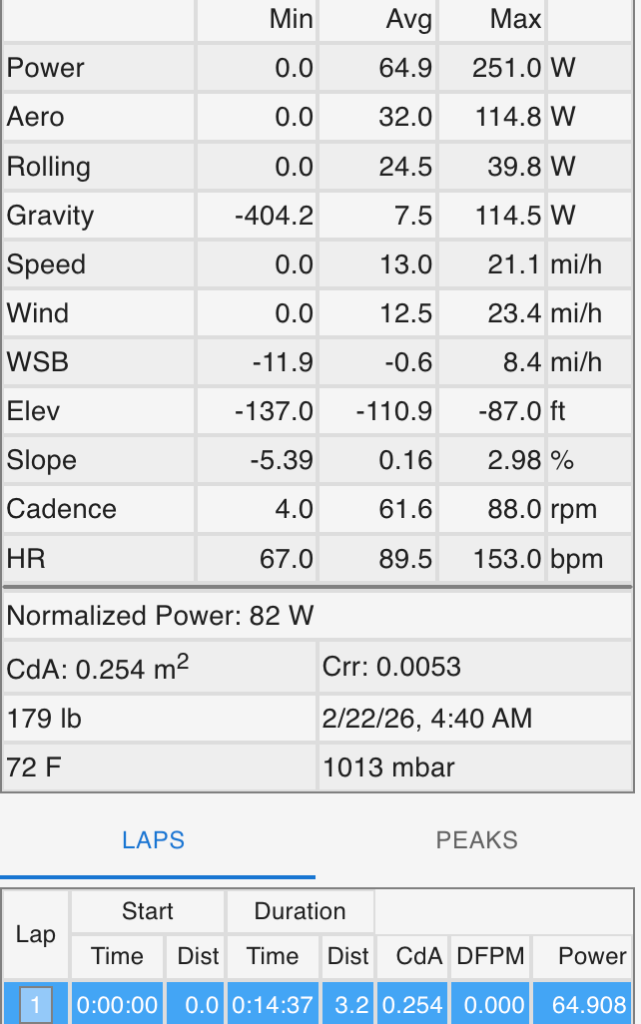
- 4.png (151.4 KiB) Viewed 23299 times
4) Hold the shift key and then click on lap 21. All 21 laps will be highlighted
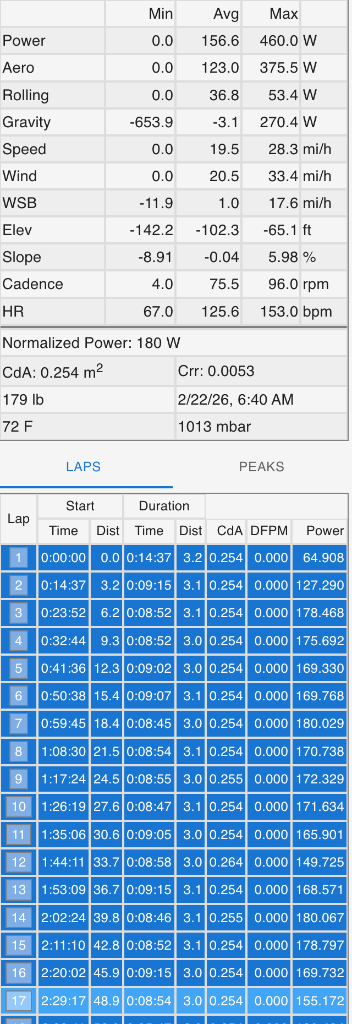
- 1.png (159.76 KiB) Viewed 23299 times
5) Right click and select "Check Device Calibration based on laps 1-21
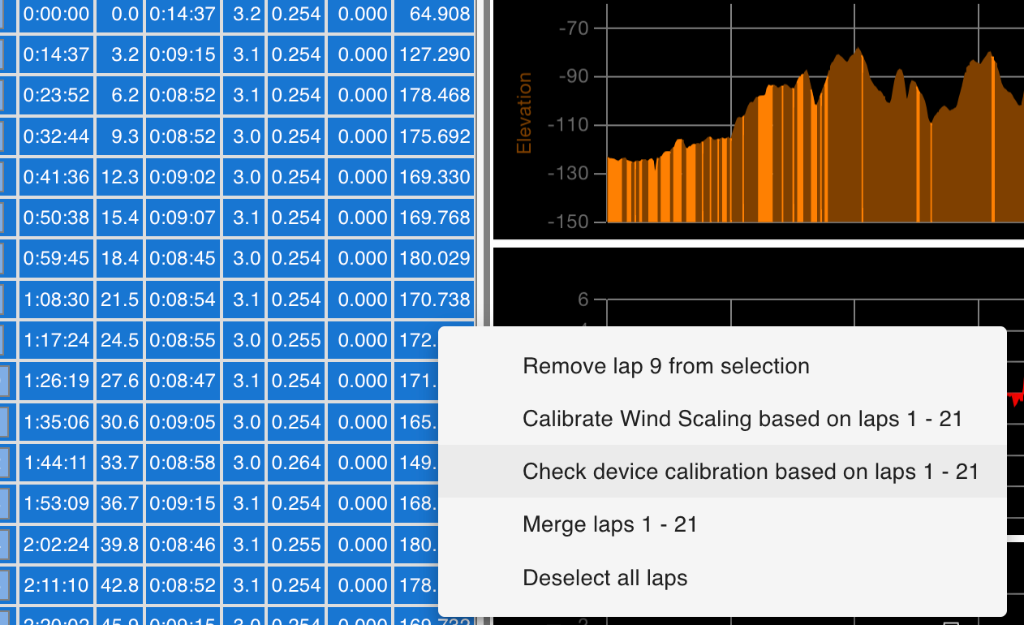
- 2.png (237.72 KiB) Viewed 23299 times
6) On the next screen you'll see the corrected profile. WSB is 0.0 (as it should be) and watts are reduced slightly to 148.6W. Click Accept to implement these changes
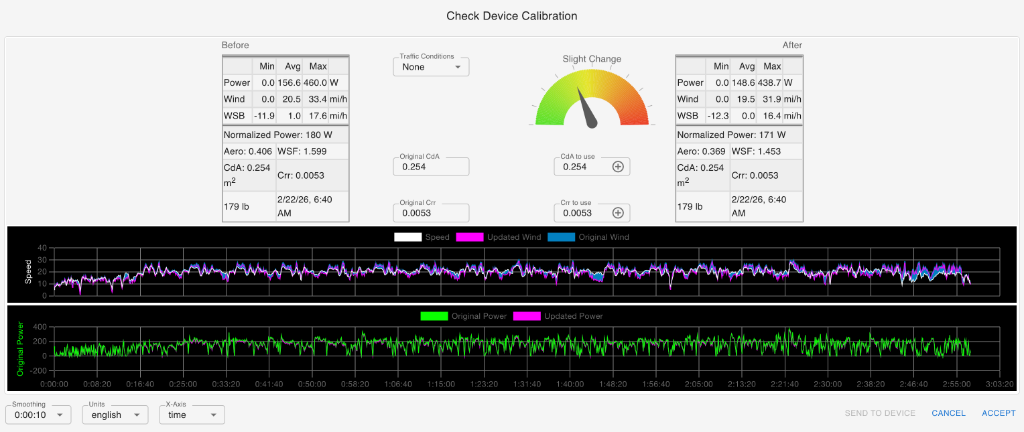
- 3.png (150.78 KiB) Viewed 23299 times
Re: AP new calbration - new garmin connect app
Posted: Mon Feb 23, 2026 3:36 pm
by kdx200
ok, very clear.
how is the procedure to send this new setup to the AP?
By the way, is there any place to download the Newton Tracker app?
thanks
Re: AP new calbration - new garmin connect app
Posted: Mon Feb 23, 2026 8:40 pm
by Velocomp
kdx200 wrote: ↑Mon Feb 23, 2026 3:36 pm
ok, very clear.
how is the procedure to send this new setup to the AP?
By the way, is there any place to download the Newton Tracker app?
thanks
1) Connect your PP to VA
2) Do the procedure above to correct your wind scaling
3) After correcting the ride file, go to Edit/Edit Profiles/Extract from Ride file. This will transfer the corrected profile into VA
4) The corrected profile will be highlighted. Use the command "Send to Device" to transfer the corrected profile to your PP
No update on Newton Tracker/Android; however, note that you can get GPS info from your Garmin into VA
Re: AP new calbration - new garmin connect app
Posted: Sun May 17, 2026 2:19 pm
by kdx200
Hi Johh,
can you check this ride from today please? seems to be ok but in some sectors i felt a lot more effort than 90-110w that garmin was showing.
Also, in 2 opportunities when i hit the lap, the app was frozen and the IQ logo apperaed in the garmin screen. In the middle of the ride, i did the field setup and no issues then. This behaviour was fixed as i know...but happened again today.
i have the edge 1050 and the app updated.
thanks
Re: AP new calbration - new garmin connect app
Posted: Sun May 17, 2026 4:54 pm
by Velocomp
kdx200 wrote: ↑Sun May 17, 2026 2:19 pm
Hi Johh,
can you check this ride from today please? seems to be ok but in some sectors i felt a lot more effort than 90-110w that garmin was showing.
Also, in 2 opportunities when i hit the lap, the app was frozen and the IQ logo apperaed in the garmin screen. In the middle of the ride, i did the field setup and no issues then. This behaviour was fixed as i know...but happened again today.
i have the edge 1050 and the app updated.
thanks
Which app are you using?
Re: AP new calbration - new garmin connect app
Posted: Mon May 18, 2026 9:10 am
by kdx200
velocomp app 1.0.2
Re: AP new calbration - new garmin connect app
Posted: Mon May 18, 2026 12:10 pm
by Velocomp
Velocomp wrote: ↑Sun May 17, 2026 4:54 pm
kdx200 wrote: ↑Sun May 17, 2026 2:19 pm
Hi Johh,
can you check this ride from today please? seems to be ok but in some sectors i felt a lot more effort than 90-110w that garmin was showing.
Also, in 2 opportunities when i hit the lap, the app was frozen and the IQ logo apperaed in the garmin screen. In the middle of the ride, i did the field setup and no issues then. This behaviour was fixed as i know...but happened again today.
i have the edge 1050 and the app updated.
thanks
Which app are you using?
There is no DFPM paired to your unit. Therefore, there is no reason to mark the end of each out-and-back lap. Marking the laps does nothing to affect power readings from your unit.
Occasionally your unit will miss lap signals sent from the Garmin. Whether this is a Garmin issue or a Velocomp issue we don't know. In any event, it is nothing to worry about.
Re: AP new calbration - new garmin connect app
Posted: Mon May 18, 2026 1:00 pm
by lorduintah
John -
I took a look at the two ride files in this thread. What I was looking for was noise on the CdA plot panel and sure enough there are a few spikes, The CdA plot should not have any of these noise spikes - and I see the exact same thing on my rides where I am using Profile #1.
As you have told me to ignore these - and I agree they should be for Profiles #1 and #2 - it suggests to me a glitch in the firmware that leads to bad data being sent to this data channel. If that is the case, it just might contaminate in eve a small way the data analysis.
I attached the CdA plot panel taken from the 93KM file that was in this message thread to illustrate the spikes.
So have you validated that these spike cannot in any way contribute to analysis errors?
Thanks,
Tom
Re: AP new calbration - new garmin connect app
Posted: Mon May 18, 2026 4:37 pm
by Velocomp
lorduintah wrote: ↑Mon May 18, 2026 1:00 pm
John -
I took a look at the two ride files in this thread. What I was looking for was noise on the CdA plot panel and sure enough there are a few spikes, The CdA plot should not have any of these noise spikes - and I see the exact same thing on my rides where I am using Profile #1.
As you have told me to ignore these - and I agree they should be for Profiles #1 and #2 - it suggests to me a glitch in the firmware that leads to bad data being sent to this data channel. If that is the case, it just might contaminate in eve a small way the data analysis.
I attached the CdA plot panel taken from the 93KM file that was in this message thread to illustrate the spikes.
So have you validated that these spike cannot in any way contribute to analysis errors?
Thanks,
Tom
These annoying blips are a consequence of (old) algorithms related to drafting corrections. They have no effect on CdA calculations.
Re: AP new calbration - new garmin connect app
Posted: Wed May 20, 2026 8:18 pm
by lorduintah
John -
Thanks for the clarification. Glad to know that they don’t corrupt the results in some hidden way.
Tom