Page 1 of 1
Powerpod configured right? Showing 30% more power than DFPM
Posted: Thu Mar 09, 2017 4:27 am
by nick2u
Hi!
Just got the Powerpod with ANT+/BLE and went for a cal ride. I also have a DFPM on my road bike. During my ride, my Powerpod is paired to a Garmin 735XT for 3s Power average and my DFPM is paired to a Garmin Edge 820 for 3s Power average as well.
Noticed 2 things:
1) My Powerpod/735XT regularly reports about 30% higher readings than my DFPM/Edge 820, with Powerpod peak wattage at 838W as compared to the DFPM's 599W. I've included the ride file (post-calibration) from both Powerpod and DFPM and cal file in this post.
2) The power readings coming from the Powerpod refresh slower than the DFPM and lags behind my DFPM in terms of reactiveness (5-10s delayed transmission), this is especially obvious during sprints. The Edge 820 has no time averaging option (only smart recording or 1s intervals), also I've updated the Power Smoothing on the Powerpod to 0s, not sure if that will help.
Is my cal ride and profile ok?
Also, how do I configure the Powerpod using my DFPM results file? I have difficulty finding the right instructions.
Thanks for reading!
Re: Powerpod configured right? Showing 30% more power than D
Posted: Fri Mar 10, 2017 4:48 pm
by Velocomp
What's happening is that your PowerPod is averaging (delaying) its signal transmission by 3 seconds, and then your Garmin is averaging (and delaying) your received PP signal by ANOTHER 3 seconds. This is why you see the delay. Also, it means that your PP will seem to read low, even when it is not (PP is giving you the power averaged over 6 seconds)
If you've updated PP to 0 second delay, this should remove the problem you are seeing.
Your PP is paired to your DFPM, but for some reason your DFPM signal dropped out during the middle portion of your ride. I don't know why.
Your cal ride and profile look OK. If you do an O&B cal ride, afterwards you can perform a "Check Calibration" and use the DFPM data to fine-tune your profile even more. See pages 68-69 of Isaac instructions for details.
The only place I see a meaningful power discrepancy is at the very end of your ride. It looks like you get out of the saddle on the final climb (a big push), then descend a hill afterwards. These present two edge cases for PP: 1) when wobbling significantly from side to side on uphills, this can affect slope readings and power. Note that your reported slope is 6%--too high when compared to prior laps where the measured slope for the same hill was about 4%. This is why PP is high on this push. 2) On descents, if you go into any kind of tuck, PP will read high. You went much faster on the last descent (33 mph vs 27 mph on prior laps), but your DFPM power was the same. PP calculates the power needed to achieve this higher speed, and assumes ride position has not changed. In fact, it looks like you were more aero...

Re: Powerpod configured right? Showing 30% more power than D
Posted: Sat Mar 11, 2017 9:34 am
by nick2u
Thanks John! I've changed all settings to zero delay - both on the Garmin 735XT and the Powerpod. Will go out for a ride tomorrow using the same setup to see how things go and report back. Couple more questions:
1) How does profile FTP impact the ride output? As my FTP increases do I constantly have to update this setting?
2) If you look at the ride files from the Powerpod/735XT and the DFPM/Edge 820, you'll notice the Powerpod/735XT gives about 30% higher power e.g. peak 838W as compared to 599W. Any idea why?
3) Pairing the Powerpod to DFPM is something I never understood. My understanding is while DFPMs pair directly over ANT+/BLE to Garmins to display power (pretty straightforward), Speed/Cadence sensors broadcast over ANT+/BLE to the Powerpod so that it computes power from this Speed/Cadence data and transmits power data over ANT+/BLE to Garmins. (Speed/Cadence sensors also broadcast over ANT+/BLE to Garmins) Is my understanding correct? So how does the Powerpod pair directly over ANT+/BLE to DFPMs? Can DFPMs transmit data to the Powerpod?
4) Not sure if calibrating the DFPM is related to the above point and needs the DFPM to be paired to the Powerpod - but I have problems. I've followed the pages on the manual as best as I could but the DFPM forces my CdA to be 0.100 which seems too low. Any idea why? How does this feature import the DFPM data? I ask this because I'm assuming that I would have to manually import DFPM data from another file (maybe from my Garmin). Screenshots attached..
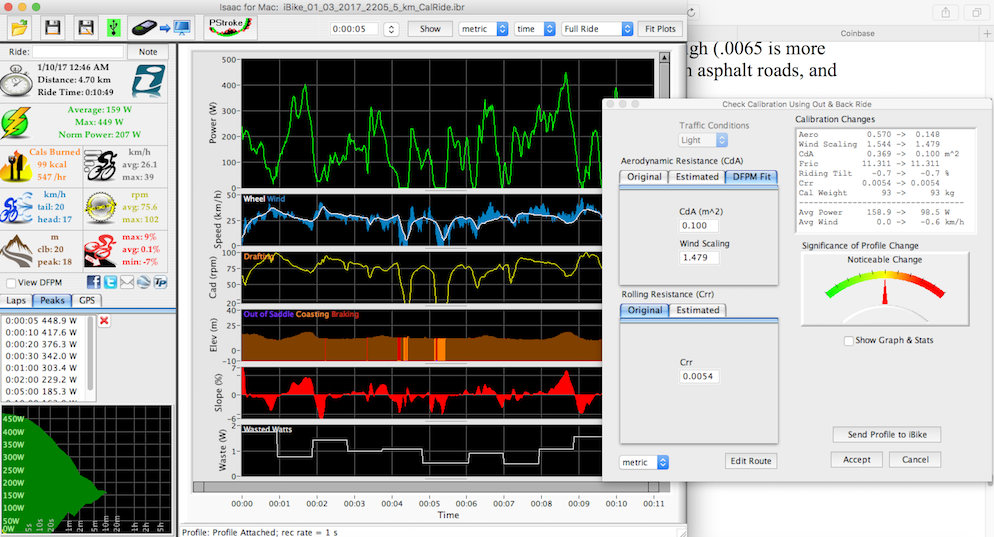
- 4) Improper CdA
- Improper CdA.png (402.82 KiB) Viewed 2670 times
5) I was looking at the Power Meter Comparison feature - what is this feature for and how is this different from DFPM calibration/pairing? There are 2 graph legends: "Newton" and "Newton DFPM", again how is the Powerpod able to incorporate DFPM data into the ride file? Screenshots attached..
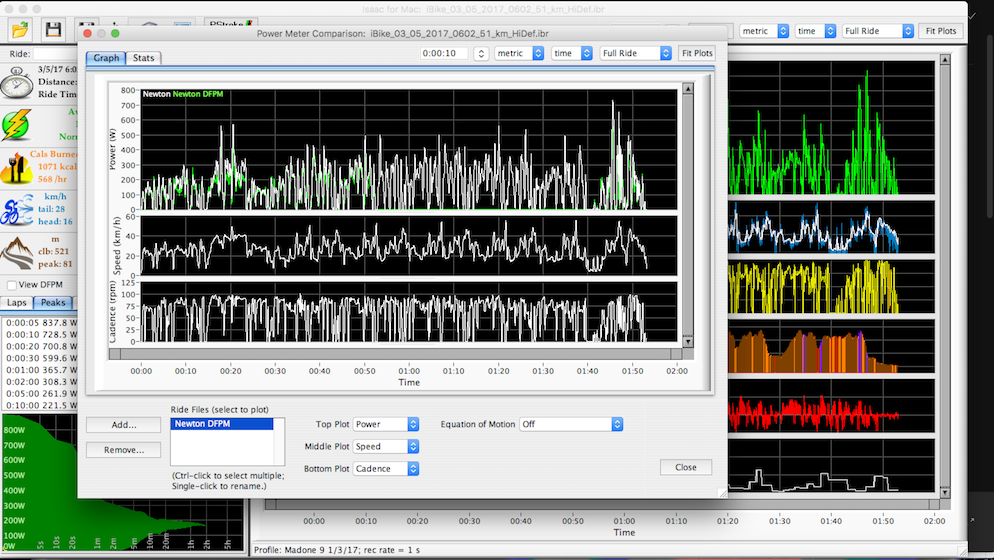
- 5) Power Meter Comparison
- Power Meter Comparison.png (437.05 KiB) Viewed 2670 times
Feels like Issac has a ton of features and I really want to learn as much as I can about all of them. Hope you can point me in the right direction..
Looking forward to your answers! Thank you!
Re: Powerpod configured right? Showing 30% more power than D
Posted: Sat Mar 11, 2017 12:38 pm
by Velocomp
1) Yes
2) I replied to this question in my prior post.
3) PowerPod receives ANT+ signals. If your DFPM broadcasts in ANT format (almost all do) then PP can pick up its signal, if you have the CdA feature installed. To check if you have this feature, go to Device/Unlock Feature/Check Unlock Status. If you see the CdA feature there then you can record DFPM data in your PP
4) Yes. Something is wrong; don't use 0.100...
Please post the ride file and I will take a look.